A simple tool for updating text in images

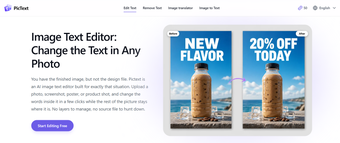
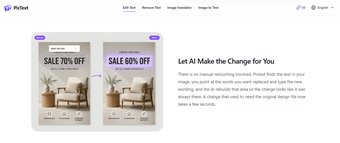
Pictext is a free AI image generator that lets you replace text in an image without recreating the whole design. It’s designed for quick edits to posters, screenshots, advertisements, and other visuals, allowing you to correct or update wording while keeping the original image intact.

Replace or correct image text

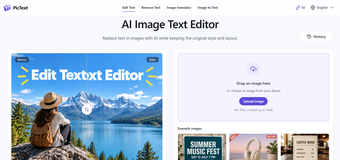
Pictext is relatively easy to use. You just have to upload JPG, PNG, or WebP files up to 10MB. The AI identifies readable text areas, and you select the words you want to change. Once the AI finishes processing the image, users can inspect the result and download the edited version. 

A neat thing about the app is that it offers free credits that refresh daily, which is useful for occasional users to try the platform without paying for a subscription. For people who edit images often, though, the daily limit can feel limiting, especially when they have several updates to make.

Make image text changes quickly

Overall, Pictext is an amazing choice for anyone who often needs to update or correct text in images. Its AI-powered tools reduce the work involved compared with traditional editing methods, and the simple interface makes it easy to use—even for people with little image-editing experience.
  • Pros

    • AI-powered text detection and replacement
    • Supports JPG, PNG, and WebP formats
    • Offers free daily editing credits
  • Cons

    • Limited to image uploads of 10MB
    • Free usage is restricted by daily credits
 0/3

App specs

  • Developer

  • License

    Free

  • Version

    1.0

  • Latest update

  • Platform

    Web Apps

  • OS

    Chrome

  • Language

    English

Program available in other languages


User reviews about Pictext

Have you tried Pictext? Be the first to leave your opinion!

Add review

Latest articles

Laws concerning the use of this software vary from country to country. We do not encourage or condone the use of this program if it is in violation of these laws.
Softonic

Is Pictext safe?

100/100

Score result: Clean

This file passed a comprehensive security scan using VirusTotal technology. It is safe to download.

  • Virus free
  • Spyware free
  • Malware free
  • Verified by Security Partners

    VirusTotal logo

Scan Info

Last scan
Wednesday, November 4, 2026
Scan provider
VirusTotal

Softonic security commitment

Pictext has been thoroughly scanned by our advanced security systems and verified by industry-leading partners. This file comes from the official developer and has passed all our security checks, showing no signs of viruses, malware, or spyware. For more information, visit our Security and Trust Center

Signed in to Softonic as